

Disposing of an old phone or computer without wiping it properly is like handing a stranger your house keys along with a copy of your diary. Even deleted files can often be recovered using forensic tools unless you take real steps to sanitize the device.
Why Deletion Fails
Simply deleting files or doing a basic reset does not erase them. The data stays on the storage drive, just marked as free space. Experts with the right tools can scan that space and pull back photos, emails, messages, and more. Studies show that most second-hand devices still contain recoverable personal information, such as logins or work files. This risks exposing bank details, private photos, work emails, or passwords for people, which means identity theft or fraud; for companies, data breaches, and legal trouble.
NIST 800-88 Security Ladder
These standard methods ramp up from basic to extreme protection. Select based on the sensitivity of your data, ranging from everyday personal information to company secrets.
Clear: Quick erase like a factory reset or delete. It hides data from casual users, but forensics can recover it. Best for low-risk personal phone sales, like a basic factory reset on an unencrypted Android or simple iOS erase.
Purge: Strong overwrite or crypto-erase that deletes the encryption key to thwart labs and experts. On modern Android or iOS phones, encrypt first, then reset, which nukes the key automatically. This fits most sales and covers 99 percent of cases.
Sanitize: Full combo of clear plus purge, with verification to leave no trace. For phones, do purge steps, then check with a tool, or turn off Find My on iOS. Ideal for company-owned devices you plan to reuse or sell.
Destroy: Physical shredding, drilling, or incinerating the storage. No recovery possible, but the device is toast. Use this for top-secret data, broken phones by crushing the chip, or pro services on drives.
A full factory reset alone is not foolproof, especially on older unencrypted Android phones. But encrypt plus reset hits purge level on modern devices, with iOS being the strongest since it wipes the encryption key.
For Personal Phones and Computers
You likely have family photos, bank logins, or personal emails at stake. Keep it simple but effective: back up what you need first, sign out of all accounts like email, cloud, apps, and banking, and disable Find My. For phones, remove SIM and SD cards, encrypt the device (automatic on new iPhones or under Security settings on Android), then do a factory reset, which reaches purge level on modern gear. For extra peace of mind on older devices, overwrite with junk data like large videos, then reset again, or use a free erasure app. On computers, back up to a secure drive or cloud, sign out and de-authorize accounts, run the built-in reset like Windows Reset or macOS Erase, and use wipe software like DBAN if worried. This protects against identity theft without overkill.
For Company Phones and Computers
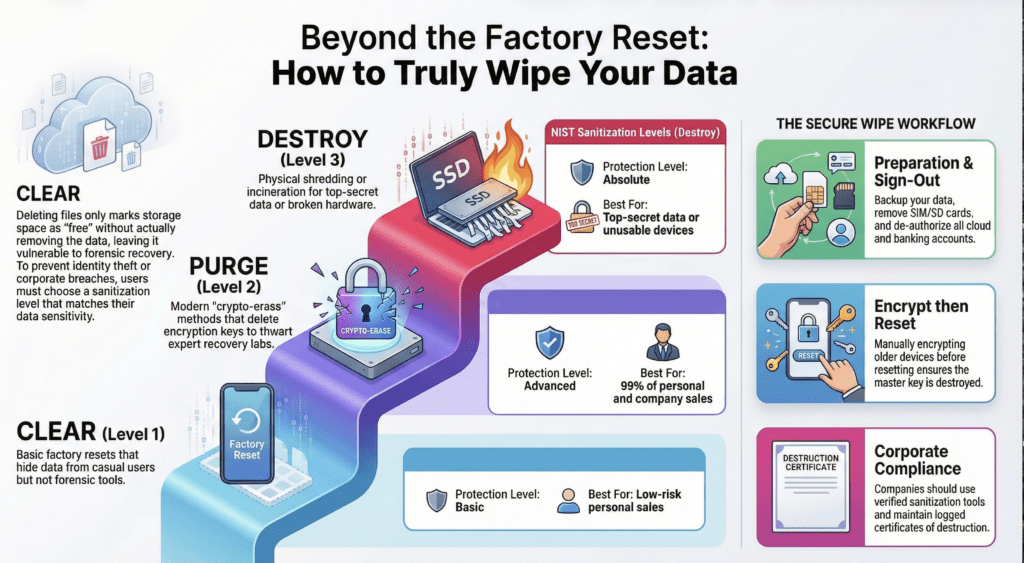
Regulations demand more to avoid fines for leaked client data, strategies, or credentials. Follow personal steps first, but always encrypt, run verified sanitization tools for multi-pass wipes or block erases, log every action with dates and methods, and get official destruction certificates—especially if physically destroying drives or chips via pro services. For phones, add verification tools after the purge steps; for computers holding years of sensitive files, such as taxes or client records, treat sanitization as standard before any reuse or sale. Make wiping a logged policy to stay compliant.
Quick Takeaway
Whether personal or company-owned, backup, sign out, encrypt, reset for purge level, then sanitize or destroy as needed based on your risks. It takes just minutes but keeps your digital life safe.